Describe what you want. Watch a team of AI
build it.
From idea to a working app, while you watch.
Step 1: Tell it what you want
You start a new project and describe the goal. Tendril turns it into a clear plan you can read.
Start a new project and tell Tendril what you'd like to build, the way you'd explain it to a friend. It asks a question or two if anything's unclear, then turns your idea into a simple checklist of tasks. (Already have a project you built elsewhere and want Tendril's memory to learn from it? Bringing in an existing project is a Starter or Pro feature.)
- You start a new project and explain what you want in plain English.
- Tendril asks anything it needs to.
- It writes a simple, ordered checklist of tasks for you to read.
- It remembers your past projects, so it already knows how you like things done.
- You approve the plan before any work begins.
- Everything stays on your computer and your code is never tracked. The only things that leave are the request your chosen AI provider needs to do the thinking, and a token-usage count Tendril keeps to apply your plan limits and prevent abuse.
Step 2: Watch the AI team build it
Several AI workers build different parts at once, then double-check their own work.
This is where Tendril is different from a single chatbot. Instead of one AI answering in a box, Tendril puts a whole team to work on a visual board. Several AI workers tackle different parts of your project at the same time, each in its own safe workspace so they never trip over each other. You watch the cards move across the board as the work gets done.
- A team of AI workers builds different parts of your project at the same time.
- Each works in its own safe workspace, so nothing clashes.
- You watch progress live as tasks move across the board.
- When it's done, the AI reviews and fixes the issues it can before calling it finished.
- In a 120-trial study, the team's quality scores were about 47% higher overall than one AI working alone — and 8x higher on the hardest task.
- It keeps going as fast as your computer and your AI plan allow.
Step 3: See it live, then approve
Try your app right inside Tendril. Nothing is saved until you say yes.
When the team's done, your app runs right inside Tendril so you can actually use it. If something looks off, you don't need to know the words for it. Just circle it, type one sentence about what's wrong, and it becomes a new task for the team to fix.
- Your finished app runs right inside Tendril, so you can try it.
- See something wrong? Circle it, describe it in a sentence, and it becomes a fix.
- You approve every change before it's saved, with a plain summary of what changed.
- The AI works in a locked sandbox and can't do anything risky on its own.
- Each project ends with one-click suggestions for what to build next.
- Everything you build makes the next project smarter.
Step 1: Tell it what you want
You start a new project and describe the goal. Tendril turns it into a clear plan you can read.
Start a new project and tell Tendril what you'd like to build, the way you'd explain it to a friend. It asks a question or two if anything's unclear, then turns your idea into a simple checklist of tasks. (Already have a project you built elsewhere and want Tendril's memory to learn from it? Bringing in an existing project is a Starter or Pro feature.)
- You start a new project and explain what you want in plain English.
- Tendril asks anything it needs to.
- It writes a simple, ordered checklist of tasks for you to read.
- It remembers your past projects, so it already knows how you like things done.
- You approve the plan before any work begins.
- Everything stays on your computer and your code is never tracked. The only things that leave are the request your chosen AI provider needs to do the thinking, and a token-usage count Tendril keeps to apply your plan limits and prevent abuse.
Step 2: Watch the AI team build it
Several AI workers build different parts at once, then double-check their own work.
This is where Tendril is different from a single chatbot. Instead of one AI answering in a box, Tendril puts a whole team to work on a visual board. Several AI workers tackle different parts of your project at the same time, each in its own safe workspace so they never trip over each other. You watch the cards move across the board as the work gets done.
- A team of AI workers builds different parts of your project at the same time.
- Each works in its own safe workspace, so nothing clashes.
- You watch progress live as tasks move across the board.
- When it's done, the AI reviews and fixes the issues it can before calling it finished.
- In a 120-trial study, the team's quality scores were about 47% higher overall than one AI working alone — and 8x higher on the hardest task.
- It keeps going as fast as your computer and your AI plan allow.
Step 3: See it live, then approve
Try your app right inside Tendril. Nothing is saved until you say yes.
When the team's done, your app runs right inside Tendril so you can actually use it. If something looks off, you don't need to know the words for it. Just circle it, type one sentence about what's wrong, and it becomes a new task for the team to fix.
- Your finished app runs right inside Tendril, so you can try it.
- See something wrong? Circle it, describe it in a sentence, and it becomes a fix.
- You approve every change before it's saved, with a plain summary of what changed.
- The AI works in a locked sandbox and can't do anything risky on its own.
- Each project ends with one-click suggestions for what to build next.
- Everything you build makes the next project smarter.
Your whole portfolio, on one board
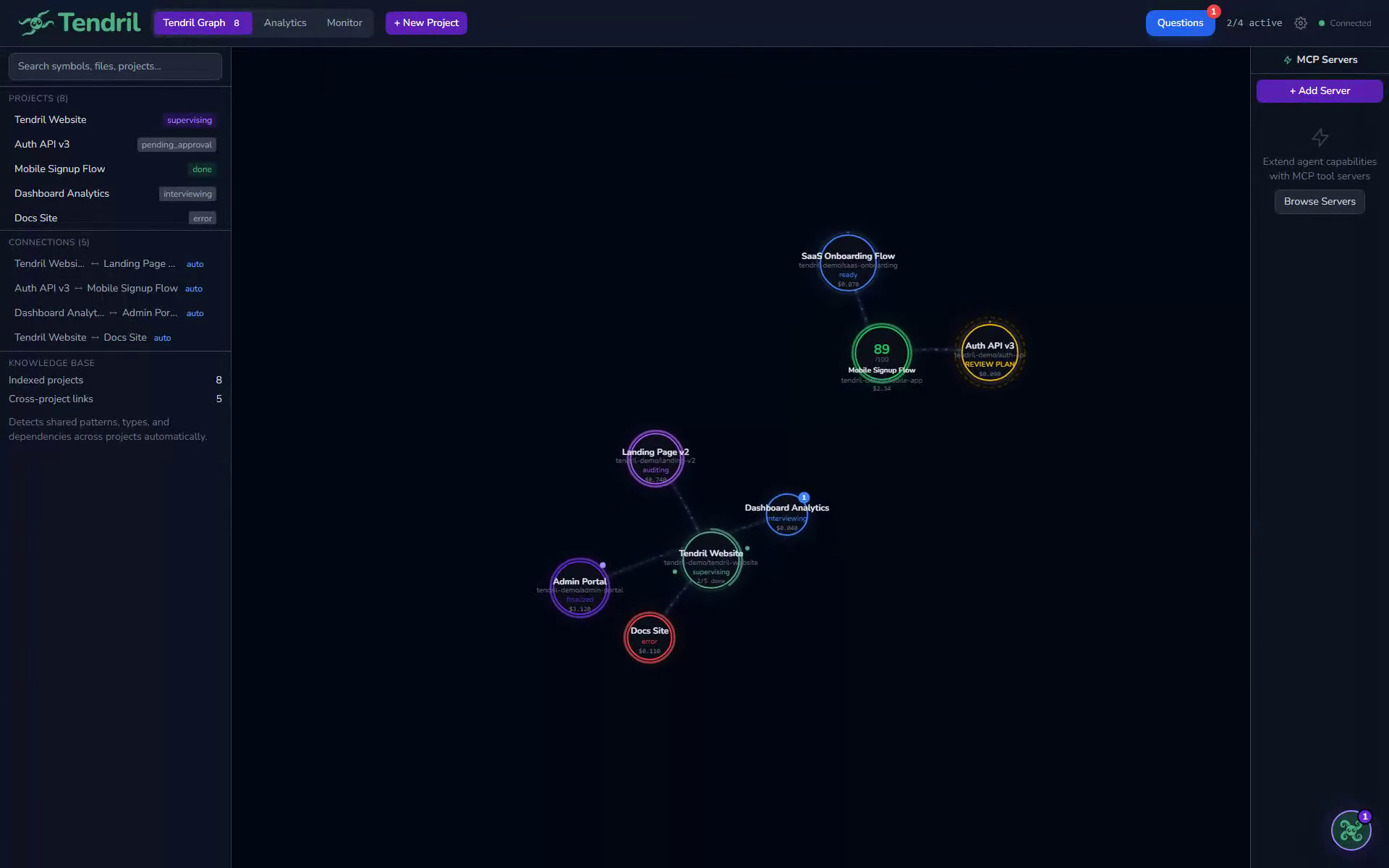
Tendril shows every project and every AI worker on one live map. You always know what's building, what's waiting, and what's done, across all your projects at once.
Ready to build something? Just describe it.
Download free, no credit card needed. Use the AI you already like, on Free, Starter, or Pro.
Common questions
The quick answers to what most people ask before they start.